Running a grocery store means managing hundreds or even thousands of products every day. From milk and bread to snacks, beverages, produce, household goods, and packaged foods, store owners must make sure the right products are available when customers need them.
But keeping track of every item manually can be difficult.
A fast-selling product may suddenly run low. An employee may forget to check a shelf. A popular item may sell out before the next supplier order arrives.
This is where automatic low-stock alerts can make a big difference.
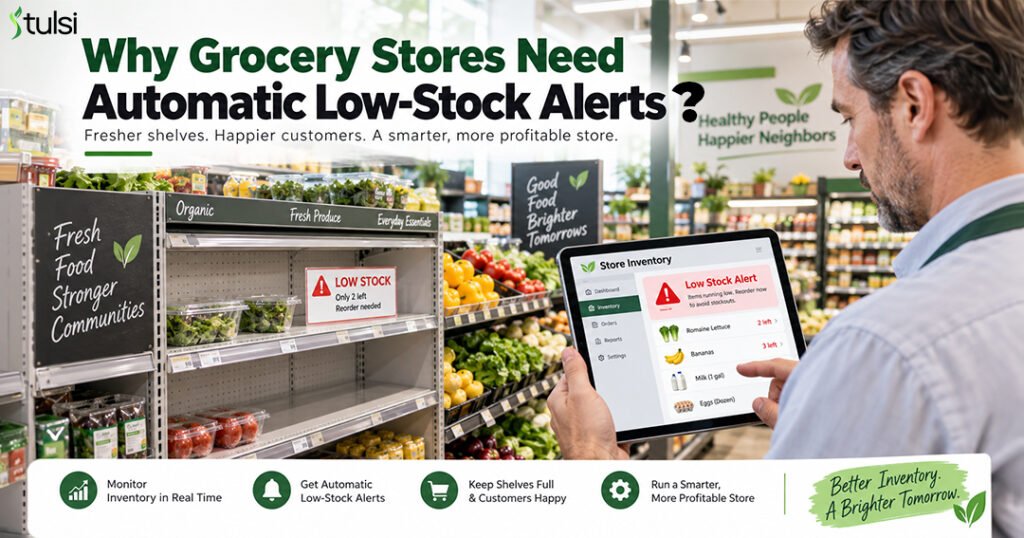
Automatic low-stock alerts help grocery stores identify products that are running low before they completely go out of stock. With a modern grocery POS and inventory management system , store owners can monitor inventory in real time and make faster restocking decisions.
What Are Automatic Low-Stock Alerts?
An automatic low-stock alert is a notification created when the available quantity of a product falls below a predefined inventory level.
For example, imagine a grocery store normally keeps 50 bottles of cooking oil in stock.
The store owner can set a minimum stock level of 10 bottles.
As customers purchase the product, the inventory quantity decreases automatically. When the quantity reaches 10, the system can flag the product as low stock.
The store team can then check additional inventory, reorder the product, or contact the supplier before the item completely runs out.
This creates a more proactive approach to grocery inventory management.
Why Are Low-Stock Alerts Important for Grocery Stores?
Grocery stores deal with products that move at very different speeds.
Some products may sell only a few times per week, while others can sell dozens of times in a single day.
Without real-time inventory monitoring, employees may not notice that a popular product is running low until the shelf is already empty.
Automatic low-stock alerts help store owners identify inventory problems earlier and take action before they affect customers.
Here are some of the biggest benefits.
Prevent Out-of-Stock Products
One of the biggest challenges in grocery retail is keeping popular products available.
When a customer visits a store and cannot find the product they want, they may purchase a different brand or leave and buy it somewhere else.
Either situation can affect sales and customer satisfaction.
Automatic low-stock alerts give grocery stores an early warning.
Instead of finding out that a product is unavailable after the last unit has been sold, the store can receive a notification when inventory reaches a minimum level.
This gives employees more time to restock or reorder the product.
Keep Best-Selling Products Available
Not every product requires the same level of attention.
High-demand products such as milk, eggs, bread, water, snacks, beverages, rice, flour, and household essentials may sell much faster than other products.
A grocery POS system with inventory tracking can monitor these products as sales happen.
When inventory approaches the minimum quantity, the system can identify the item as low stock.
This helps store owners focus on products that are selling quickly instead of manually checking every shelf.
Save Staff Time
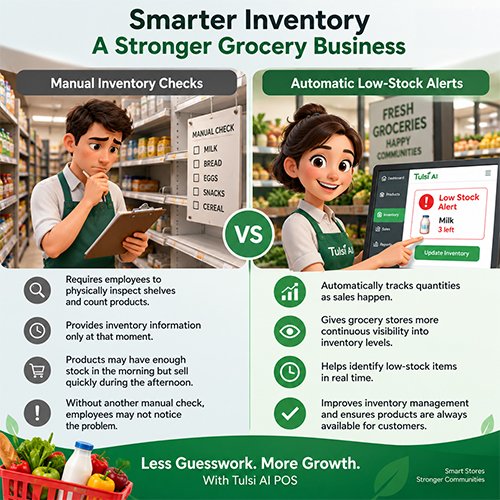
Manual inventory checking takes time.
Employees may have to walk through aisles, count products, check back-room inventory, update spreadsheets, and report missing stock.
For a grocery store with thousands of products, this can become a major daily task.
Automatic inventory alerts reduce the need for constant manual checking.
Employees can focus on products that already require attention.
This allows staff to spend more time on other important tasks such as:
- Helping customers
- Receiving deliveries
- Restocking shelves
- Managing checkout
- Organizing products
- Updating pricing
- Maintaining the store
Automation can make everyday store operations more efficient.
Improve Reordering Decisions
Knowing when to reorder inventory is important.
Ordering too late can result in stockouts.
Ordering too early can create excess inventory.
Automatic low-stock alerts help store owners identify when a product may need to be reordered.
For example, if a fast-selling beverage reaches its minimum inventory level, the store manager can check supplier availability and place another order.
The purchasing decision can happen before the shelf becomes empty.
Better inventory visibility can help grocery stores maintain healthier stock levels.
Reduce Overstocking
Inventory management is not only about preventing low stock.
Stores must also avoid carrying too much inventory.
This is especially important for grocery businesses because many products have limited shelf lives.
Produce, bread, dairy products, refrigerated food, meat, and other perishables can become waste if too much inventory is ordered.
Better stock visibility helps store owners understand which products actually need replenishment.
Instead of ordering the same quantity every time, stores can make purchasing decisions based on current inventory and sales activity.
Identify Fast-Moving Products
Automatic low-stock alerts can also help reveal sales trends.
If the same product repeatedly reaches its low-stock level, it may be selling faster than expected.
This information can help store owners improve purchasing strategies.
For example, they may decide to:
- Increase reorder quantities
- Order more frequently
- Keep additional back-room inventory
- Adjust minimum stock levels
- Monitor demand during weekends or holidays
Low-stock alerts are not only warnings.
They can also provide valuable insights into customer demand.
Respond Faster to Customer Demand
Customer demand can change quickly.
A product may become more popular because of a promotion, holiday, seasonal event, social media trend, or price change.
Traditional inventory planning may not immediately reflect these changes.
Real-time inventory tracking allows grocery stores to see what is happening as customers shop.
If a product starts selling faster than expected, a low-stock alert can help the store respond sooner.
This can make inventory management more flexible and responsive.
Improve Multi-Store Inventory Management
Managing inventory becomes more complicated when a business operates multiple grocery store locations.
One location may have too much of a product while another location is almost out.
A centralized inventory management system can help owners monitor stock across stores.
Managers can identify which location needs inventory and determine whether products should be reordered or transferred between stores.
This can improve inventory visibility across the entire business.
Manual Inventory Checks vs. Automatic Low-Stock Alerts
How Tulsi AI POS Can Help Grocery Stores Manage Inventory
Modern grocery stores need more than a basic checkout system.
They need technology that connects sales, inventory, products, purchasing, and business reporting.
Tulsi AI POS is designed to help grocery store owners simplify everyday operations and gain better visibility into their business.
With smarter inventory management, store owners can monitor product quantities, identify products that require attention, understand sales activity, and make more informed inventory decisions.
Instead of waiting for a customer to report that a product is missing, store owners can use inventory information to identify potential problems earlier.
This helps move grocery inventory management from a reactive process toward a more proactive approach.
The Future of Grocery Inventory Management
Traditional inventory management often asks:
“What products are already out of stock?”
Modern inventory management asks:
“Which products are about to run out?”
That difference can have a major impact on grocery operations.
Automatic low-stock alerts help store owners monitor inventory, prevent unexpected stockouts, improve purchasing decisions, save employee time, and keep popular products available.
As grocery stores become more data-driven, real-time inventory visibility will continue to play an important role in daily operations.
For stores that want to improve efficiency and provide a better customer experience, automatic low-stock alerts are becoming an essential inventory management tool.
Frequently Asked Questions About Automatic Low-Stock Alerts
1. What is a low-stock alert?
A low-stock alert is a notification or warning generated when the available quantity of a product falls below a predefined inventory level. It helps store employees identify products that may need to be restocked or reordered.
2. Why do grocery stores need low-stock alerts?
Grocery stores often manage thousands of products. Low-stock alerts help employees identify products that are running low without manually checking every shelf. This can help prevent stockouts and improve product availability.
3. How do automatic low-stock alerts work?
The store defines a minimum stock quantity for a product. As products are sold, inventory decreases. When the inventory reaches the configured minimum level, the system flags the product as low stock.
4. Can a POS system automatically track grocery inventory?
Yes. A grocery POS system with integrated inventory management can update product quantities as sales and inventory transactions occur.
5. Can low-stock alerts help prevent stockouts?
Yes. Low-stock alerts provide an early warning before inventory reaches zero, giving store employees time to restock or reorder products.
6. Are low-stock alerts useful for small grocery stores?
Yes. Small grocery stores can benefit because employees often handle several tasks at once. Automatic alerts can reduce the need for frequent manual inventory checks.
7. What products should have low-stock alerts?
Low-stock alerts can be especially useful for best-selling products, essential grocery items, promotional products, seasonal products, and items that take longer for suppliers to deliver.
8. How should a grocery store set its minimum stock level?
The minimum stock level can depend on average sales, supplier lead time, product popularity, available storage, seasonal demand, and how frequently the product is reordered.
9. Can low-stock alerts help reduce food waste?
They can contribute to better inventory planning. Improved inventory visibility can help stores avoid unnecessary ordering and maintain inventory levels that better match customer demand.
10. Can low-stock alerts work across multiple store locations?
Yes. A centralized inventory system can help managers monitor stock at several locations and identify which stores may need replenishment.
11. What is the difference between low stock and out of stock?
Low stock means some inventory remains, but the quantity has reached a predefined minimum level.
Out of stock means there is no available inventory remaining.
Low-stock alerts are designed to give the store time to act before the item becomes completely unavailable.
Conclusion
Managing grocery inventory manually becomes more difficult as product selection, transaction volume, and store locations grow.
Automatic low-stock alerts give grocery store owners a simple way to identify inventory problems before shelves become empty.
With real-time inventory tracking and a modern POS system, grocery retailers can make smarter replenishment decisions, reduce manual work, improve product availability, and better understand customer demand.
Tulsi AI POS helps grocery businesses manage inventory, sales, and store operations from a smarter, more connected system.
Keep Your Shelves Ready With Tulsi AI
Stay informed about your inventory, understand what is selling, and manage your grocery store with better visibility.